Finally, one tool that handles the log AND the recording. I don't know how I did depositions without it.
Trial attorney, civil litigation
Annotate in real time. Mark exhibits. Keep track of spellings. All in one app.
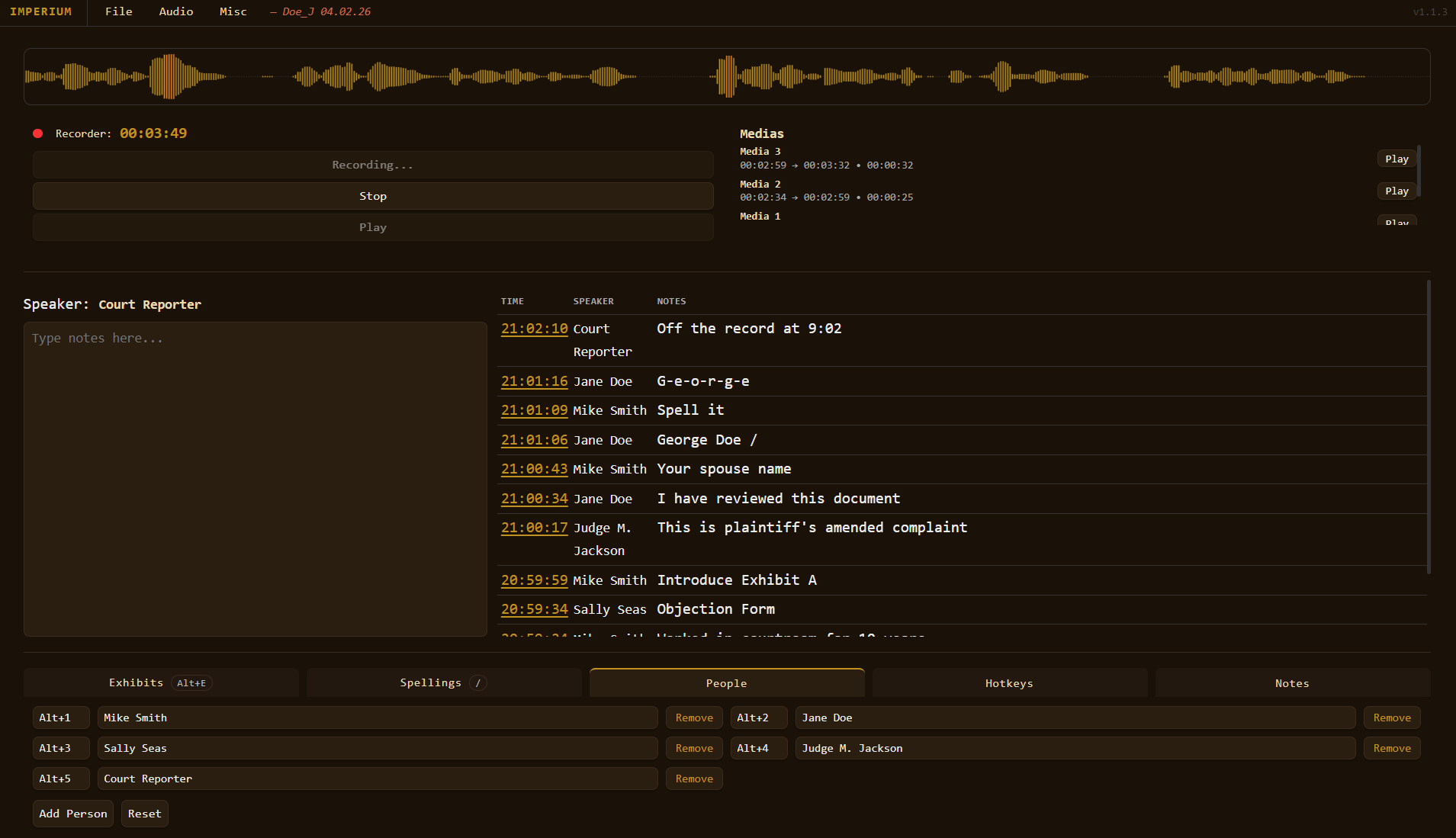
Juggling a recorder, a notepad, and a transcript is exhausting. Speakers get misidentified. Timestamps drift. Exhibits pile up with no clear record. Imperium was designed by legal professionals, for legal professionals — to handle everything in one place, in real time.
Features
Every note you type is pinned to the exact moment it was entered. No guessing, no backfilling — just an accurate, chronological record you can print and hand over.
Whether you're in the room or on Zoom, Imperium captures both your microphone and system audio in parallel — perfect for remote depositions where every word matters.
Log exhibits as they're introduced and track verified spellings as they're confirmed — all within the same interface, linked to the same session.
When the session ends, export a fully formatted deposition record — log, exhibits, spellings, and reporter notes — as a clean PDF, ready to file or share.
Export your recording as a labeled MP3 file, organized by case name and saved automatically to your Documents folder. No third-party software needed.
Assign hotkeys to frequently used speaker names, phrases, or actions. The more you use Imperium, the faster it gets.
Imperium continuously saves your session in the background. If something goes wrong, your notes and audio come back exactly where you left them.
How it works
Name your case, select your audio devices, and begin recording with a single click.
Log entries, exhibits, and spellings as they happen. Timestamps are applied automatically.
Print a formatted PDF or export your MP3 audio. Files are saved to your Documents folder, organized by case.
Testimonials
Finally, one tool that handles the log AND the recording. I don't know how I did depositions without it.
Trial attorney, civil litigation
The Zoom loopback recording alone is worth the price. No more separate recorder apps.
Court reporter, remote depositions
Clean, fast, and it just works. The hotkeys alone save me 20 minutes per session.
Legal assistant, mid-size firm
Pricing
All plans include a machine-locked license key, auto-updates, and email support.
View full pricing →Privacy
Imperium runs entirely on your computer. Your notes, your audio, and your case files never leave your machine. Licensing is verified securely in the background — no accounts, no cloud sync, no data collection.
FAQ
Yes. Imperium records system audio directly from your PC using WASAPI loopback, capturing whatever is playing through your speakers — including Zoom calls — with no extra software.
Project files are saved to Documents\Imperium\[CaseName]\ on your computer. Nothing is stored in the cloud.
Each license is machine-locked to a single device. If you need coverage across multiple machines, contact us about enterprise licensing.
Imperium automatically saves your session as you work. When you reopen the app, it will offer to restore your last session — notes and all.
Yes. Download the trial to explore Imperium before purchasing a license.
Ready to start?
Download Imperium and take your first session today.
Windows 10 / 11 · 64-bit · Free trial available